
I Once Watched My Own Face in a Webcam for Four Hours and That Is How I Learned What Blend Shapes Cannot Teach You
Fifty-two blend shapes, seventeen takes into a MacBook camera, and one NPC named Miriam. The best facial animation isn't about mastering the sliders — it's about learning to see when a combination of decimal values has produced a face that feels like a person.
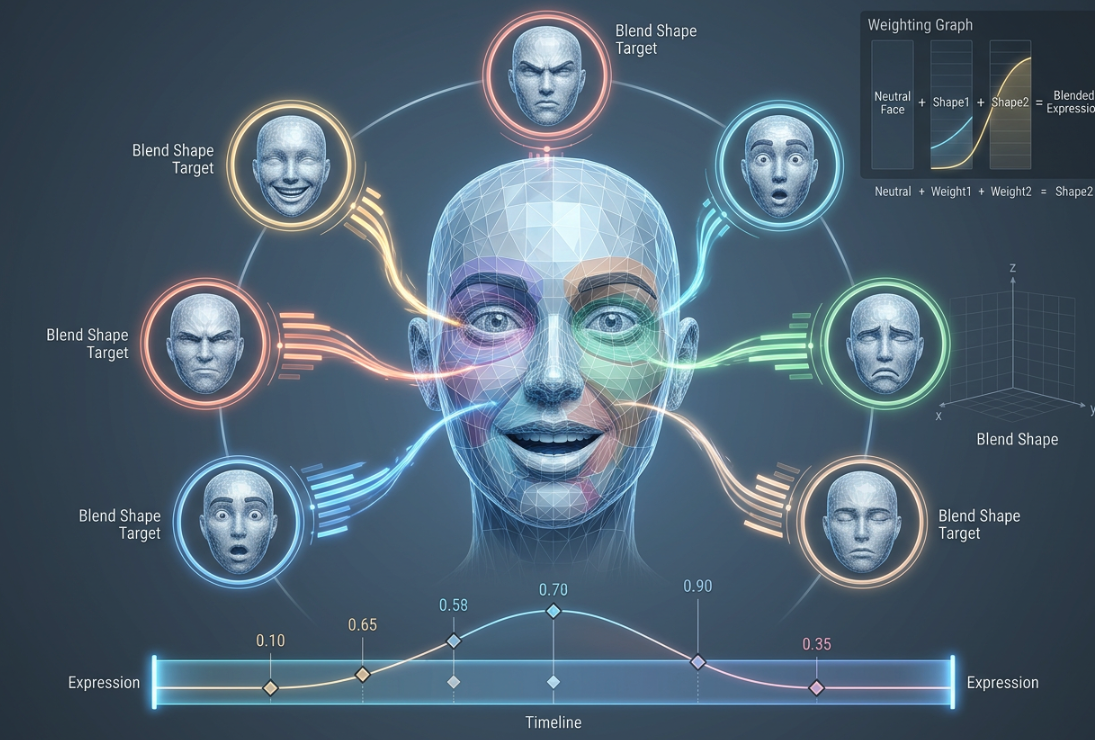
Fifty-two blend shapes, seventeen takes into a MacBook camera, and one NPC named Miriam. What four hours of making faces at a webcam taught me about why the best facial animation comes from subtraction, not addition.
The character was named Miriam. She was an NPC in a small narrative game I worked on in 2023 — a mother whose son had gone missing in a mining accident. She appeared in exactly three scenes. In the first scene, she was supposed to look "worried but holding it together." Not crying. Not angry. Not neutral. The moment before tears — when the face knows what is coming but the person is still fighting it.
I had fifty-two blend shapes for Miriam's face. I knew every one of them by name: BrowLower_L, LipCornerPucker_R, CheekRaise_L, NasolabialDeepener. I had named them myself in Maya, late at night, in a room that smelled like coffee and the specific plastic of a Wacom tablet that had been used for six years. I sat there sliding weights — 0.3 on BrowFurrow, 0.15 on LipTightener, maybe 0.1 on EyeWiden to show fear but not too much — and Miriam looked like she was having a stroke. The left side of her face was worried. The right side was confused. The middle was neither. She looked like three different people had been assigned different halves of one expression and nobody had talked to each other.
I did this for two hours. Then I did something I had never done before. I opened Photo Booth on my Mac and I tried to make the expression myself.
The Mirror Problem
Here is the thing nobody tells you about facial animation: you do not know what your own face looks like when it is worried. You think you do. Everybody thinks they do. You have been worried thousands of times in your life. You have a mental image of "worried" that feels complete and specific. Then you open a webcam and try to perform "worried but holding it together" and the face looking back at you is not worried at all. It is squinting. It might be constipated. It is certainly not whatever you thought it was.
I spent forty minutes making faces at my laptop camera. I recorded seventeen attempts. I named the files "worried_01" through "worried_17" and by "worried_09" I had stopped being able to tell the difference between any of them. They all looked like a man who had just been told his Amazon package was delayed. Not tragic. Just mildly inconvenienced.
But something happened around attempt fourteen. I stopped trying to "perform" worried and just thought about the scene. Miriam's son. The mining accident. The three days she would wait for news that would not come. And my face changed — not because I was a good actor, but because I stopped acting and started thinking. The webcam caught it. I looked at the recording and I could see the exact frame where my face shifted from "trying to look worried" to "worried." The difference was mostly in the eyes. The brows moved slightly less than I thought they should. The mouth barely moved at all. The worry was not in any single feature. It was in the absence of relaxation — the face holding itself still against an impulse to collapse.
I went back to Miriam's blend shapes. I set BrowFurrow to 0.2 instead of 0.3. I killed LipTightener entirely. I added 0.08 of EyeWiden — barely perceptible — and 0.05 of a shape I had named JawRelease, which was just the jaw dropping open by about two millimeters. It was almost nothing. It was the most convincing worried expression I had ever made.
That was the first thing I learned: the best blend shape combination is usually the one with fewer shapes, not more. The face at rest is already doing most of the work. You are not building an expression from scratch. You are nudging the resting face in a direction and hoping it lands somewhere true.
The Problem with Fifty-Two Levers
Blend shapes work like this: you start with a neutral mesh — the character's face at rest. Then you create deformed copies of that mesh. One copy has the eyebrows raised. Another has the mouth open for an "ah" sound. Another has the cheeks pushed up for a smile. Each copy is called a blend shape or a morph target, and each one has a slider from 0.0 to 1.0 that controls how much of that deformation is applied.
When you slide BrowRaise_L to 0.4 and LipSmile to 0.6 and CheekRaise to 0.3 at the same time, the engine adds all those deformations together and the character's face becomes something new — something that is not any single shape in your library. That is the magic. That is also the problem.
Fifty-two sliders. Each slider from 0.0 to 1.0 in increments of 0.01. The total number of possible face configurations is a number so large I cannot write it down without sounding like I am making it up. It is larger than the number of human faces that have ever existed. And 99.9% of those configurations look wrong — not just "not the expression I wanted" but actively wrong, like the face is being pulled in directions that no human face has ever been pulled.
The job of the animator is to find the 0.1% that look like a real person feeling a real thing. This is not a technical skill. It is a search problem. You are searching a space of millions of possible faces for the one that feels true. The blend shapes are the vocabulary, but the animator is the one who knows which words go together and — more importantly — which words cancel each other out.
I learned this through failure. For Miriam, I tried combining Smile with Worry to create a "brave face" expression. It looked like someone had told her a joke at a funeral. Smile and Worry pull the face in opposite directions — Smile lifts the cheeks and widens the mouth, Worry pulls the brows together and tightens the lips. The engine does exactly what you tell it to do: it adds both deformations and gives you a face that is smiling and worrying at the same time, which is not a thing human faces do. Human faces pick one and let the other show in the eyes.
What Keyframes Actually Feel Like
Once you have your blend shapes, you animate them with keyframes. A keyframe is just a point on the timeline where you set the values of every slider. At frame 0, Miriam's face is neutral — all sliders at 0. At frame 120, she is worried — sliders set to the combination I found. The engine interpolates between them. Over two seconds, her face transitions from neutral to worried.
The problem with interpolation is that it is mathematically smooth and emotionally wrong. A real human face does not transition from neutral to worried at a constant speed. The first half-second is fast — the brain registers the bad news and the face responds before the person can control it. Then it slows down — the person tries to compose themselves, to hold it together. Then it settles — the expression locks into place, not because the emotion has stopped changing but because the face has found the shape it will wear until the person is alone.
I could not get this right with two keyframes. I needed six. Frame 0: neutral. Frame 15: initial shock — a sharp intake motion, JawRelease at 0.1, EyeWiden at 0.15, everything fast. Frame 40: the first attempt at control — BrowFurrow comes in, EyeWiden drops slightly, the mouth closes. Frame 80: the emotion breaks through again — a deeper worry, the brows pulling harder. Frame 100: the second attempt at control — the face settles. Frame 120: the expression locks — not at its most extreme, but at its most sustainable. This is the face she will wear for the rest of the conversation.
Six keyframes for two seconds of animation. Nobody watching the game would notice the keyframes. They would just see a woman receiving bad news and trying not to fall apart. That is the goal: make the technique invisible. The audience should see the emotion, not the sliders.
The Lip-Sync Problem
Miriam had dialogue. She had forty-seven lines of dialogue, and every one of them needed her mouth to match the sounds she was making.
I tried automating it. I fed the audio files into a lip-sync tool — I will not name it because the problem was not the tool, the problem was me — and the tool generated blend shape weights for every phoneme. Miriam's mouth opened and closed on the correct syllables. Her lips rounded for "ooh" sounds and spread for "ee" sounds. Technically, it was correct. Visually, she looked like she was chewing gum. Her mouth was moving too much. Real people do not open their mouths as wide as phoneme shapes suggest. Real speech is lazy. The mouth does the minimum necessary to produce the sound, and the tongue and teeth do the rest.
I went back and reduced every phoneme weight by 40%. Then I reduced the "rest" shape — the shape her mouth returned to between words — by another 20%. She went from "chewing gum" to "talking." The difference was entirely in what I removed, not what I added.
This is the second thing I learned: good facial animation is mostly subtraction. You spend most of your time removing things — dialing shapes back, killing unnecessary motion, letting the face be still. A face that is doing too much looks uncanny. A face that is doing almost nothing, with one small thing happening at the right moment, looks real.
Watching an AI Do It in Fifteen Seconds
In late 2024, I tried NVIDIA's Audio2Face. You feed it an audio file. It feeds the audio through a neural network. The network outputs blend shape weights for every frame. The character's face animates itself.
It took fifteen seconds to process Miriam's longest monologue — a forty-second speech about what her son was like as a child. The result was better than my manual animation in two ways: the timing was more natural, and the micro-movements — the tiny, unconscious adjustments that faces make between major expressions — were present in a way I had not been able to achieve.
It was also worse in one way: the emotional arc was flat. The AI knew when to move the mouth for speech and when to raise the brows for emphasis, but it did not know that the line "he used to bring me rocks from the quarry" was supposed to be sad and the line "he said they were diamonds" was supposed to be sadder. It animated both lines with the same emotional weight. The face was alive but the performance was dead.
I ended up using the AI output as a base layer and adding manual keyframes on top for the emotional beats. The AI handled the mouth shapes — the tedious, repetitive work of matching phonemes to visemes. I handled the eyes, the brows, the tiny JawRelease that told you she was about to cry. It was the best work I had ever done, and it was a collaboration between a neural network and a person who had spent four hours making faces at a webcam to learn what worried looks like.
The third thing I learned: AI is better than you at the boring parts. You are better than AI at the parts that mean something. The blend shape is the bridge between the two — the format that both systems speak. It does not matter whether the weight value came from a neural network or from a person sliding a control at 2 AM. What matters is whether the face that results feels true.
What Nobody Says at GDC
Game developers give talks about blend shape pipelines. They show screenshots of their editors. They explain their naming conventions. They never say the thing that matters most: the blend shape library is never complete.
At some point in every project, you will need an expression you did not make. A character needs to look "relieved but suspicious" or "proud and also terrified" or "the specific face you make when you realize the thing you have been looking for was in your pocket the whole time." You do not have a blend shape for that. You will never have a blend shape for that. You will combine shapes that were never meant to be combined and you will slide sliders to values that feel wrong and you will preview the result and it will look bad and you will try again and it will look slightly less bad and eventually it will look like something a human might feel.
That is the job. Not mastering the tools. Learning to see when a combination of fifty-two shapes at specific decimal values has produced a face that feels like a person. The blend shapes do not contain the performance. You contain the performance. The blend shapes are just the levers. You are the one who knows what the face should look like because you have spent your entire life reading faces and you cannot explain how you do it. You just know.
My producer asked me once, after a late-night session, how I knew when an expression was "right." I did not have an answer then. I have one now: you know it is right when you stop seeing the sliders and start seeing the person.
Miriam shipped. She was in three scenes. A player on Reddit, two months after release, posted about her. The post said: "There's this NPC early in the game, a mother whose son is missing, and when you talk to her she looks like she's about to cry the entire time but she never does. I almost cried instead."
That was worth the four hours in front of the webcam. That was worth the seventeen files named "worried_01" through "worried_17." That was worth every slider I slid at 2 AM in a room that smelled like coffee and Wacom tablet.
Blend shapes are just vertices. The face is just a mesh. The performance is just numbers on a timeline. And somehow, if you get the numbers right, a stranger on the internet will almost cry at a character you made.